
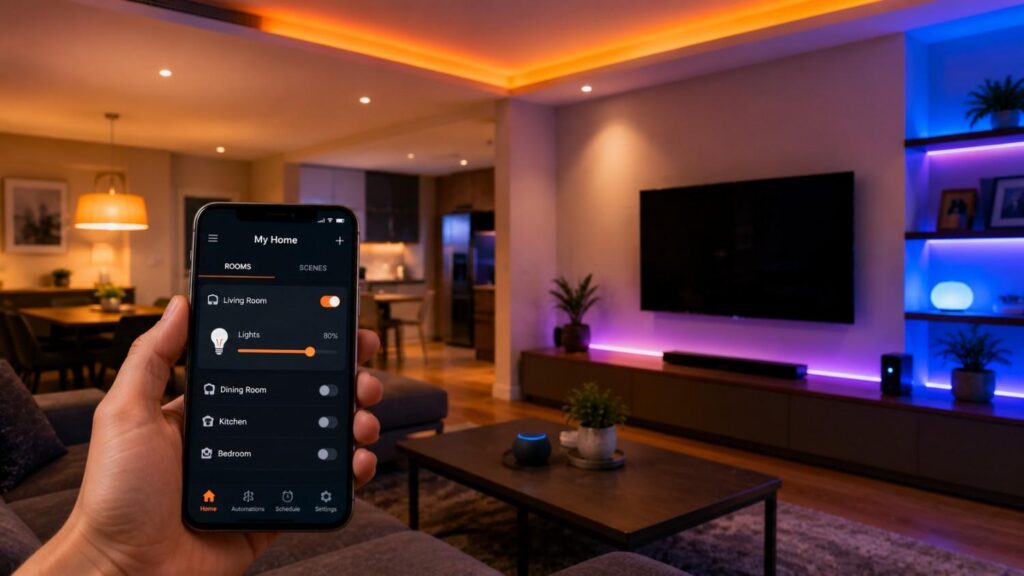
Smart Home Lighting Hacks: Enhance Your Space with Technology
Smart Home Lighting Hacks: Enhance Your Space with Technology is not simply about replacing ordinary lamps with connected bulbs. The most useful results come from combining thoughtful lighting design, reliable controls, and automations that reflect how people actually use each room.
A comfortable space normally needs more than one light source. Ambient lighting provides general visibility, task lighting supports activities such as cooking or reading, and accent lighting creates depth by highlighting artwork, shelving, plants, or architectural details. Smart controls allow these layers to change together rather than requiring several individual adjustments.
Technology can make lighting more responsive. A work scene can brighten task areas, an evening scene can reduce overhead glare, and a motion sensor can provide low-level guidance through a hallway at night. Voice control and applications add convenience, but they should complement rather than replace obvious physical controls.
LED technology provides an efficient foundation. ENERGY STAR states that LED products can produce light up to 90% more efficiently than incandescent bulbs, while the U.S. Department of Energy describes LEDs as the most energy-efficient widely available lighting technology. Actual household savings depend on wattage, brightness, operating time, and the lamps being replaced.
Smart technology cannot correct poor placement automatically. A bright, exposed ceiling lamp may remain uncomfortable even after it gains an application. Begin by putting the right type of light where it is needed, then automate those choices.
In my experience, dependable smart lighting provides three layers of control: physical switches for immediate access, routines for repeated behaviour, and application or voice control for occasional changes. This structure keeps the home usable for residents, children, visitors, and anyone who does not want to reach for a phone.
The following smart lighting hacks explain how to choose devices, organise rooms, build useful scenes, improve energy management, and protect the connected system without making everyday lighting harder to operate.
Choose the Right Smart-Lighting Foundation
Before creating scenes or routines, decide which parts of the lighting system should become connected. The main options are smart bulbs, smart wall switches, smart dimmers, connected plugs, sensors, and fully integrated fixtures. Each category solves a different problem, and buying the wrong type can create unnecessary complexity.
Smart bulbs provide detailed control over individual lamps. Depending on the model, they may support dimming, tunable white, color, schedules, effects, and grouped scenes. They work well in table lamps, decorative fixtures, rented homes, and rooms where different bulbs need different settings.
Smart switches and dimmers control the electrical circuit rather than the individual lamp. They are often more intuitive in rooms with several bulbs because anyone can use the wall control normally. They can also prevent the common problem of connected bulbs becoming unreachable after someone turns off the conventional switch.
Smart plugs are suitable for floor and table lamps that need simple on-and-off automation. Sensors add occupancy, motion, or daylight information, while light strips provide flexible indirect or accent illumination.
Electrical compatibility must be treated seriously. LED lamps and dimmers do not always work correctly together. Lutron maintains an LED compatibility tool because unsuitable combinations can cause flicker, buzzing, poor low-level dimming, delayed response, or incomplete shutoff.
The ideal system often combines several device types. Main ceiling circuits may use smart switches, decorative lamps may use smart bulbs, and hallways may use sensors. This mixed strategy delivers advanced features without sacrificing familiar control.
| Device Type | Best Use | Main Benefit | Important Limitation |
|---|---|---|---|
| Smart bulb | Lamps and individual fixtures | Brightness, color, and separate control | Requires continuous electrical power |
| Smart switch | Multi-bulb ceiling circuits | Familiar wall control for the entire circuit | Installation and wiring compatibility matter |
| Smart dimmer | Dimmable room lighting | Physical and automated brightness adjustment | Must match the connected LED load |
| Smart plug | Table and floor lamps | Simple schedules and remote switching | Usually limited to on-and-off control |
| Motion sensor | Hallways, stairs, bathrooms, utility rooms | Hands-free occupancy automation | Placement and timeout require testing |
| Light strip | Shelves, cabinets, desks, and media walls | Flexible indirect and accent lighting | Visible LED points can look unfinished |
Smart Bulbs or Smart Switches?
Choose smart bulbs when individual fixtures need separate brightness, color, or tunable-white settings. They are especially effective in bedside lamps, reading corners, decorative pendants, and accent fixtures where each source contributes differently to a scene.
Choose a smart switch when several ordinary bulbs should behave as one circuit. A connected wall switch preserves familiar physical control, making it practical for kitchens, bathrooms, hallways, and ceiling fixtures used by multiple people.
Smart bulbs usually require continuous electrical power so they can remain connected to applications, sensors, and routines. Philips Hue’s in-wall solutions are designed to keep connected bulbs powered while allowing conventional-looking wall controls to trigger scenes and automations.
Avoid placing a smart bulb behind an incompatible conventional dimmer. Both devices may attempt to regulate power, producing flicker, unreliable connectivity, or poor dimming performance.
Renters may prefer bulbs and plugs because they require fewer permanent changes. Homeowners may find switches cleaner for multi-bulb circuits.
A balanced design often uses switches for primary fixtures and smart bulbs for lamps or decorative lighting. The decision should reflect daily behaviour, not simply which product has the longest feature list.
Plan for Matter, Hubs, and Ecosystem Compatibility
Select a primary smart-home ecosystem before purchasing several devices. Consider which phones, smart speakers, displays, and existing accessories are already used in the household. A coherent ecosystem makes room assignment, voice control, sharing, and automation easier.
Matter is designed to improve interoperability among certified accessories and supported platforms. Its multi-admin capabilities allow compatible devices to connect to multiple ecosystems, giving households more flexibility when different family members prefer Apple Home, Google Home, Amazon Alexa, or another certified platform.
Matter does not guarantee that every advanced feature appears identically everywhere. Basic switching and dimming may be available across ecosystems, while proprietary effects, firmware settings, or advanced scenes may remain inside the manufacturer’s application.
Some accessories require a bridge, Matter controller, or Thread border router. Apple currently requires a home hub for adding Matter accessories to the Home app, and Thread-based accessories require a suitable Thread-enabled hub.
Before purchasing, confirm the supported ecosystem, fitting, voltage, hub requirements, dimming functions, update policy, and whether the desired advanced features work outside the manufacturer application. This preparation prevents a collection of disconnected products from becoming separate and inconvenient systems.
Related Articles
Build Better Lighting with Layers, Zones, and Scenes
Connected controls deliver the most value when the underlying lighting design is already useful. One of the best smart home lighting ideas is to organise fixtures by purpose rather than treating every bulb as an isolated device.
Begin with ambient lighting. This is the general illumination that allows people to move through the room safely. Ceiling fixtures, wall lights, or reflected lamps may provide this layer. Ambient lighting should be comfortable and evenly distributed rather than excessively bright.
Task lighting supports a specific activity. Examples include under-cabinet lights for food preparation, a desk lamp for working, a floor lamp beside a reading chair, or focused lighting near a bathroom mirror. Task lights often need greater brightness than the rest of the room but should avoid glare.
Accent lighting creates visual depth. It may illuminate artwork, shelves, plants, textured walls, or the back of a television. Accent lighting is normally most effective when the source itself is concealed.
After identifying the layers, create zones. A zone combines fixtures that serve one activity even when they are connected to different circuits. Names such as “Kitchen Worktops,” “Reading Corner,” or “Media Wall” are more useful than technical product names.
Scenes save the settings for multiple zones. A “Dinner” scene might lower ceiling lights and activate pendants, while a “Work” scene could brighten the desk and surrounding wall.
Keep the scene library manageable. Four dependable scenes are generally more useful than twenty effects with unclear names. Each scene should support a real activity and remain easy to activate through a switch, application, routine, or voice command.
Exploring layered lighting ideas can also help you visualize how scenes and accent lighting work together to create a more balanced living space.
Use Brightness and Color Temperature Deliberately
Brightness is measured in lumens, while correlated color temperature describes the appearance of white light. Lower color temperatures generally look warmer or more yellow, while higher values appear cooler or more blue-white.
Use bright, neutral light where visual detail matters. Kitchens, workshops, desks, and bathroom mirrors often benefit from clearer task illumination. Living rooms and bedrooms usually feel more relaxing when lighting is warmer and dimmer during the evening.
The right setting varies according to the room, wall colors, reflective surfaces, natural light, age, eyesight, and personal preference. Automation should make adjustment easier rather than enforcing one universal formula.
A practical daily sequence may use gentle warm light after waking, brighter neutral lighting during work or cleaning, reduced warm lighting after sunset, and very low amber-toned illumination for nighttime movement.
Tunable-white bulbs make these transitions convenient, but standard warm-white dimmable LEDs can still create an effective evening atmosphere.
Avoid using strongly saturated colors as the only functional light source. Colored light works best as an accent while a separate white source maintains visibility.
Scenes should be tested while performing the activity they support. A setting that looks attractive in a photograph may be too dark for reading or too reflective for watching television.
| Room | Recommended Smart Lighting | Automation Idea | Main Benefit |
|---|---|---|---|
| Living Room | Smart bulbs + accent light strips | Movie and Relax scenes | Comfortable ambience and entertainment lighting |
| Kitchen | Under-cabinet task lights + smart switch | Motion-triggered task lighting | Better visibility while cooking |
| Bedroom | Tunable-white smart bulbs | Sunrise wake-up and bedtime routine | Improved comfort and sleep-friendly lighting |
| Hallway | Motion sensor + warm LED lights | Night-time motion activation | Safe navigation without bright overhead lights |
| Bathroom | Motion sensor + dim warm lighting | Low-brightness night mode | Convenience during late-night visits |
| Home Office | Bright tunable-white lighting | Work mode schedule | Better focus and productivity |
| Outdoor Area | Smart floodlights or porch lights | Sunset-to-sunrise schedule | Security and energy savings |
Hide Light Sources to Create Softer Accent Lighting
Indirect illumination usually looks more refined than a visible row of bright LEDs. Position light strips or compact fixtures so that their output reflects from a wall, ceiling, shelf, or cabinet surface before entering the room.
Useful locations include behind a television, beneath kitchen cabinets, along the rear edge of a desk, behind a headboard, under a stair handrail, or inside a display cabinet. Reflected light creates depth while reducing direct glare.
Test the placement before using permanent adhesive. Sit, stand, and walk through the room to check whether individual LED points remain visible. If the strip can be seen directly, an aluminium channel and diffuser may create a smoother line.
Follow the manufacturer’s bend-radius, cutting, ventilation, and power-supply instructions. Confirm that a strip is rated for damp, wet, or outdoor use before installing it in a bathroom, kitchen splash area, or exterior location.
Connect accent lights to practical room scenes. A “Movie” scene might lower ceiling fixtures and activate soft lighting behind the screen, while a “Display” scene could illuminate shelves without brightening the entire room.
The objective is visual support, not novelty. Accent lighting should strengthen the architecture and activity of the room without becoming a distracting feature itself.
Design-focused examples of lighting design techniques also demonstrate how indirect illumination and careful fixture placement can improve ambience without creating glare.
Automate Lights with Motion, Schedules, and Everyday Routines
Home lighting automation works best when the trigger and result are predictable. Time, sunset, occupancy, door activity, and deliberate voice commands generally produce more dependable routines than complex chains of uncertain conditions.
Motion sensors are particularly useful in transitional or short-occupancy spaces. Hallways, stairs, entrances, utility rooms, wardrobes, garages, and bathrooms often benefit from hands-free lighting because people may enter while carrying objects or remain only briefly.
A sensor should not always activate every light at full brightness. During daylight, the automation may do nothing. In the evening, it can activate normal illumination. Overnight, it can trigger a low-level warm path light that supports safe movement without fully waking the household.
Schedules suit predictable events. Exterior lights can operate around sunset and sunrise, while bedroom or living-room scenes can change according to wake, dinner, and bedtime routines. Voice commands are valuable when users want to trigger several actions together.
Philips Hue motion sensors can automate lights and adjust their behaviour according to the time of day. Current Hue software also supports using daylight information to prevent activation when an area is already bright enough.
Every automation should include an easy override. A person reading quietly should not be left in darkness because the sensor failed to detect movement. Likewise, a guest should be able to operate a room without understanding the automation.
The best routines gradually disappear into daily life. People notice the convenience, not the technology. Begin with predictable situations, then add complexity only when it solves a specific problem.
| Automation Method | Best Use Case | Key Advantage | Consideration |
|---|---|---|---|
| Motion Sensors | Hallways, stairs, bathrooms | Hands-free lighting | Requires proper sensor placement |
| Scheduled Lighting | Daily routines | Automatic on/off at set times | Best for predictable schedules |
| Sunset & Sunrise Automation | Outdoor and evening lighting | Adjusts with seasonal daylight | Requires location-based setup |
| Voice Commands | Living rooms and bedrooms | Instant manual control | Depends on voice assistant availability |
| Smart Scenes | Multiple rooms | Controls several lights together | Needs initial configuration |
| Occupancy Detection | Frequently used rooms | Reduces unnecessary energy use | May require compatible sensors |
| Manual Smart Switches | Shared family spaces | Easy operation for everyone | Should remain accessible as a backup |
Create a Useful Evening and Bedtime Routine
An effective evening routine changes the atmosphere gradually rather than switching every fixture from bright to dark at once. Around sunset, activate selected entryway, living-room, and exterior lights. Later, reduce overhead brightness and shift tunable-white fixtures toward warmer settings.
A bedtime routine might turn off downstairs ceiling lights, leave a low-level hallway path illuminated, switch decorative lighting off after a short delay, and activate a dim bedroom scene. Separate routines can support different household members, such as “Good night downstairs” and “All lights off.”
Alexa Routines can group compatible smart-home actions and activate them through schedules, voice commands, and supported device triggers. Similar functions are available through Apple Home, Google Home, and many manufacturer applications.
Do not make essential stair or exterior lighting dependent entirely on a cloud service or voice command. Preserve reliable physical and scheduled controls.
Test the routine with everyone who uses the space. One person’s bedtime action may accidentally turn off another person’s reading lamp or workspace.
A dependable routine should reduce decisions at the end of the day while leaving enough flexibility for unusual schedules, visitors, or late-night activities.
Tune Motion Sensors to the Room
Sensor placement determines whether motion-sensor lighting feels natural or irritating. Position the sensor so it detects people entering the intended area rather than movement through an adjacent doorway, window, or busy corridor.
Consider the direction of travel. Many sensors detect movement across their field more effectively than movement directly toward them. Test the location temporarily before drilling holes or applying permanent adhesive.
Avoid pointing the sensor toward moving curtains, heating sources, reflective windows, or a pet’s regular path unless sensitivity settings can compensate. False triggers may cause unnecessary lighting and encourage users to disable the automation.
Set the timeout according to the activity. A hallway can switch off quickly after motion stops, while a bathroom, utility room, or reading area needs a longer delay. Very short timeouts often cause lights to switch off while someone remains present but relatively still.
Use daylight thresholds where available so lights do not activate unnecessarily. At night, trigger a lower-brightness source rather than harsh overhead illumination.
In kitchens, a sensor can control under-cabinet task lights while the main ceiling circuit remains manual. In bedrooms, a floor-level path light is usually more comfortable than a bright ceiling fixture.
Motion automation is most successful when occupancy is brief, hands-free control is valuable, and the expected response is obvious.
Improve Reliability, Energy Use, and Smart-Home Security
A connected lighting system should remain usable when a phone is unavailable, a visitor enters the room, or an internet service experiences an interruption. Reliability begins with physical controls, sensible naming, appropriate networking, and a design that does not depend on one person’s technical knowledge.
Preserve manual control wherever possible. Smart wall switches, wireless remotes, scene controllers, and clearly labelled buttons allow anyone to operate the lights without opening an application. Automations should reduce repetitive work while leaving users free to override them.
Energy savings begin with efficient lamps. ENERGY STAR reports that LED lighting can produce light up to 90% more efficiently than incandescent bulbs. Smart controls may reduce unnecessary operating time, but decorative lights left on continuously still consume electricity.
Use vacancy timeouts, sunset schedules, daylight sensing, and lower brightness where full output is unnecessary. Avoid adding so many connected accent fixtures that their operating hours offset the efficiency gained from LEDs.
Security is also part of reliability. The Federal Trade Commission advises consumers to keep connected-device firmware and applications updated, use available security features, and research how long manufacturers provide software support. It also recommends WPA3 Personal or WPA2 Personal encryption for home Wi-Fi.
Install controller applications through official manufacturer links or recognised application stores. Use unique passwords, enable multi-factor authentication when available, and protect the email account associated with the smart-home platform.
Finally, document the setup. Record the owner account, hubs, bridges, essential switches, recovery instructions, and device locations. A system becomes more resilient when another trusted person can understand and maintain it.
Design Graceful Manual Fallbacks
Every frequently used room should have an obvious physical control. Guests, children, older residents, and household members who prefer conventional switches should not need an application or voice assistant to operate basic lighting.
For connected bulbs, use compatible wireless controls or in-wall solutions that preserve continuous power. Otherwise, someone may turn off the ordinary wall switch and make the bulbs unreachable until power is restored.
For smart switches, configure the main press to perform a sensible default action even when advanced scenes or internet-dependent services are unavailable. Secondary presses or long presses can control less common scenes.
Use clear device and room names. “Kitchen Ceiling,” “Kitchen Worktop,” and “Kitchen Dining Pendant” are easier to manage than several devices named “Smart Bulb.” Distinct names also reduce voice-control errors.
Document which ecosystem owns the home, where bridges are installed, how devices are reset, and which switches must remain powered.
When selling or transferring a connected home, remove personal accounts, transfer supported ownership, and reset accessories that will remain. The FTC advises considering account and device transfer when a smart property changes ownership.
A graceful fallback does not remove smart features. It ensures the home remains practical when those features are temporarily unavailable.
Use Energy Automations That People Will Keep
Energy-saving routines should operate quietly and predictably. Start with locations where lights are frequently left on, such as storage rooms, corridors, bathrooms, garages, laundry areas, and exterior spaces.
Vacancy timeouts are useful when people forget to switch lights off. Daylight thresholds prevent motion sensors from activating lamps unnecessarily. Sunset and sunrise schedules are generally more adaptable than fixed clock times for exterior lighting because they follow seasonal changes.
A “Leave Home” routine can turn off grouped interior lights, while a late-night schedule can reduce decorative lighting that no longer serves a purpose. Lower brightness can also reduce consumption when maximum output is unnecessary, although the exact savings depend on the device and dimming method.
Select lamps by lumens and wattage rather than relying only on equivalent incandescent labels. The U.S. Department of Energy identifies LED technology as highly energy-efficient, while ENERGY STAR explains that LED products provide the same useful light with substantially less electricity than incandescent lamps.
Verify dimmer compatibility before installation. An unsuitable LED and dimmer combination can produce flicker, poor low-end performance, or inconsistent control.
The best energy routine is one people allow to remain enabled. Simple, dependable behaviour usually saves more energy than an ambitious system that becomes annoying and is eventually disabled.
Frequently Asked Questions About Smart Home Lighting Hacks: Enhance Your Space with Technology
Questions about Smart Home Lighting Hacks: Enhance Your Space with Technology commonly focus on value, connectivity, device selection, energy use, Matter, and cybersecurity. The correct answer often depends on the type of room and the problem being solved.
A smart bulb may be ideal for a decorative lamp but inconvenient in a busy hallway where people expect a conventional wall switch. A connected switch may provide better whole-room control but cannot usually change the color of ordinary bulbs. Motion sensors work well in transitional spaces but require careful placement and sensible timeouts.
Compatibility is another common concern. Some devices connect directly through Wi-Fi or Bluetooth, while others need a bridge, Matter controller, or Thread-enabled hub. Matter can improve cross-platform support, but proprietary effects and advanced configuration may still require the manufacturer’s application.
Energy performance depends on both lamp efficiency and behaviour. LEDs provide the main reduction in electricity use, while automation helps prevent unnecessary operating time. A connected lamp is not automatically efficient merely because it can be controlled remotely.
Security should be considered before purchase. Manufacturers differ in their update policies, account protections, privacy practices, and long-term support.
The following answers provide practical guidance for planning a reliable setup. Beginners should start with one room and one clear objective, then expand after learning which features the household genuinely uses. A small system with sensible physical controls and dependable routines often delivers more value than a large collection of poorly coordinated accessories.
Are Smart Lights Worth Installing?
Smart lights can be worthwhile when they solve a repeated problem. Common examples include fixtures with inconvenient switches, lights that are regularly left on, the need for low-level nighttime guidance, or several lamps that must be adjusted together.
They provide less value when an application simply replaces an already convenient wall switch. Smart technology should reduce effort rather than add another step.
Begin with one room and define the intended improvement. A hallway may benefit from motion automation, while a living room may gain more from grouped scenes and dimming.
Consider the total cost, including bulbs, switches, hubs, bridges, remotes, and possible professional installation. Also review how long the manufacturer commits to software support.
Smart lights are generally most worthwhile when they combine efficient LEDs, dependable physical controls, and routines that match everyday behaviour.
Avoid purchasing devices only because they offer colorful effects. Those features may be enjoyable, but practical improvements such as reliable dimming, scheduling, and hands-free control often deliver greater long-term value.
Do Smart Bulbs Work When the Wall Switch Is Off?
Most smart bulbs do not work when the wall switch is off because the bulb no longer receives electrical power. Without power, it cannot maintain its connection, respond to an application, receive voice commands, or follow scheduled automations.
The simplest solution is to keep the conventional switch on and use a compatible wireless remote, scene controller, or smart button for everyday control.
Another option is an in-wall solution designed to maintain power while converting the existing control into a smart input. Manufacturer guidance should be followed because wiring requirements differ.
Avoid placing tape over an ordinary switch as the only long-term solution, especially in shared homes where the reason may not be obvious.
For rooms where people frequently use the wall switch, a connected switch controlling ordinary compatible bulbs may provide a more reliable experience.
Smart bulbs work best when individual color, tone, or fixture-level control is important and continuous power can be maintained without confusing household members.
Is a Smart Bulb Better Than a Smart Switch?
Neither option is universally better. Smart bulbs are preferable when users need independent dimming, color, tunable-white settings, or separate control over several lamps within one room.
Smart switches are usually preferable for ceiling fixtures containing multiple bulbs or rooms where familiar wall control is essential. One connected switch can control the entire circuit without requiring every lamp to contain its own radio and processor.
Smart bulbs may be easier for renters because they can be removed without changing permanent wiring. Smart switches may be cleaner for homeowners building a long-term system.
Installation also differs. Replacing a bulb is simple, while fitting a wall switch may require compatible wiring, appropriate electrical knowledge, and professional installation.
A mixed system often works best. Use connected switches for main overhead circuits and smart bulbs for lamps, decorative fixtures, and accent lighting.
The decision should be based on how people use the room, whether individual color control is required, and how important conventional physical control is.
Do I Need a Hub for Smart Lighting?
The requirement depends on the device and communication technology. Some smart bulbs connect directly through Wi-Fi or Bluetooth, while others use a manufacturer bridge, Matter controller, Zigbee hub, or Thread-enabled home hub.
A hub can provide benefits such as local automation, reduced router congestion, remote access, or more dependable communication among accessories. It also adds another device that must remain powered and maintained.
Matter accessories require a compatible Matter controller within the selected ecosystem. Thread-based Matter devices additionally need a suitable Thread border router. Apple currently requires a home hub to add Matter accessories to Apple Home.
Google Home also documents compatible hardware requirements for Matter setup and control.
Before purchasing a bulb or switch, read the official setup requirements rather than assuming it connects directly to a phone.
A hub-free device may appear simpler, but a bridge-based system can sometimes provide stronger local reliability and better management when many accessories are installed.
Can Smart Lights Save Energy?
Smart lighting can reduce electricity use when efficient LEDs are combined with routines that prevent unnecessary operation. Vacancy sensors, schedules, daylight thresholds, and grouped “leave home” commands can switch off lights that might otherwise remain on.
The largest improvement normally comes from replacing inefficient incandescent lamps with LED products. ENERGY STAR reports that LED lighting can produce equivalent light using substantially less electricity.
Actual savings vary. They depend on wattage, brightness, the number of fixtures, operating hours, previous lamp technology, and whether household members already switch lights off consistently.
Connected devices also consume a small amount of standby power to remain reachable. For most bulbs, this does not eliminate the efficiency benefit of LED technology, but it reinforces the importance of avoiding unnecessary devices and operating hours.
Smart lighting should therefore be viewed as an energy-management tool rather than an automatic guarantee of lower bills.
Use lumens to compare useful brightness and select the lowest suitable wattage. Then automate predictable waste without creating routines that household members find frustrating.
What Does Matter Mean for Smart Lighting?
Matter is a common connectivity standard developed to improve smart-home interoperability, setup, reliability, and security. Matter-certified lighting products can work with supported Matter ecosystems rather than being limited to one proprietary control platform.
The standard’s multi-admin capability allows compatible devices to be connected to multiple ecosystems or applications. This may help a household where different members use different phone or voice-assistant platforms.
Matter does not guarantee identical functionality everywhere. A light may support basic on, off, and dimming controls across several ecosystems while advanced animations or manufacturer-specific effects remain available only in the original application.
Hardware requirements also vary. Some Matter devices communicate through Wi-Fi, while others use Thread and require a Thread border router.
Check the product’s certification, supported device type, controller requirements, and available features before buying.
Matter can reduce ecosystem lock-in, but it should be considered one part of the purchasing decision alongside light quality, physical controls, update support, and electrical compatibility.
Are Smart Lights Secure?
Smart lights should be treated like other connected household devices. They may be linked to personal accounts, home networks, voice assistants, occupancy routines, and location-related schedules.
Keep device firmware, bridges, controller applications, phones, and routers updated. The FTC recommends checking for firmware updates and using the latest version of connected-device applications.
Use strong, unique passwords for the smart-home account and associated email address. Enable multi-factor authentication when the platform provides it.
Protect the Wi-Fi network with WPA3 Personal or WPA2 Personal encryption and replace default router administration credentials.
Before purchasing, investigate the manufacturer’s update policy and how it communicates the end of software support. Avoid products from vendors that provide no clear security or privacy information.
Grant household and guest access carefully. Remove old users and reset devices before selling or transferring them.
Smart lighting is generally a lower-risk category than cameras or locks, but weak accounts and unsupported devices can still create unnecessary exposure.
Conclusion
Smart Home Lighting Hacks: Enhance Your Space with Technology works best as a practical design strategy rather than a collection of disconnected gadgets. Begin with the activities performed in each room, then select lighting layers and connected controls that make those activities easier.
Use ambient lighting for general visibility, task lighting for focused work, and accent lighting to create depth. Choose smart bulbs when individual brightness, color, or white-tone control matters. Choose smart switches for whole circuits and familiar wall operation. Use plugs for simple lamps and sensors for short-occupancy areas.
Organise devices into clearly named rooms and zones. Create a small number of scenes for working, relaxing, dining, watching television, entertaining, and preparing for sleep. Automate predictable routines such as sunset, bedtime, vacancy, and nighttime movement.
Matter may make supported accessories easier to share across compatible ecosystems, but buyers should still verify hub requirements, Thread support, advanced features, fitting, voltage, and software-update policies.
Energy efficiency begins with appropriate LED lamps. Automation then reduces unnecessary operating time through schedules, sensors, and daylight-aware controls.
Reliability and security should remain part of the design. Preserve physical switches, use clear names, document the setup, install updates, protect accounts, and secure the home network.
The best smart-lighting system is not the one with the most devices. It is the one that quietly makes the home safer, more comfortable, more efficient, and easier for everyone to use. Start with one room, solve one repeated problem, and expand only after the first setup works naturally.
Start with One Room and One Routine
Choose a room where lighting creates a clear daily inconvenience. A hallway may need hands-free nighttime illumination, while a living room may benefit from coordinated reading, entertainment, and evening scenes.
List the existing fixtures and identify which lighting layer each one provides. Decide whether individual bulbs need separate control or whether the entire circuit should operate together.
Select the simplest suitable device. A motion sensor and one dimmable lamp may solve a hallway problem without requiring several connected fixtures. A smart wall switch may be more appropriate than six individual bulbs in a ceiling fixture.
Create one routine and test it for several days. Observe activation timing, brightness, timeout, false triggers, and whether users reach for the manual control.
Adjust the routine before expanding the system. This gradual approach limits cost, simplifies troubleshooting, and reveals which features people actually use.
Once the room works reliably, repeat the same naming, scene, security, and fallback principles elsewhere.
Consistency across rooms is more valuable than a large number of advanced effects that nobody remembers how to activate.
Make Technology Support the Space
The best smart lighting remains secondary to the room and the people using it. Residents should notice that the space feels comfortable and responsive, not that every fixture demands technical attention.
Place task lighting where visual detail matters. Use reflected or concealed accent lighting to soften hard surfaces. Lower brightness and warmer tones when the goal is rest, conversation, or nighttime orientation.
Automate repeated actions, but preserve manual choice. A routine should make the likely action easier without preventing someone from selecting another scene.
Avoid forcing voice control as the only interface. A person carrying shopping, a visitor unfamiliar with the command, or someone using the room quietly should still have an obvious physical option.
Review the system periodically. Remove unused scenes, update device software, replace unclear names, and adjust schedules as household routines change.
Smart lighting succeeds when it eliminates small daily frustrations: entering a dark hallway, searching for a switch, adjusting several lamps individually, or discovering that lights were left on.
Technology should adapt to the home rather than requiring the household to adapt to the technology.