
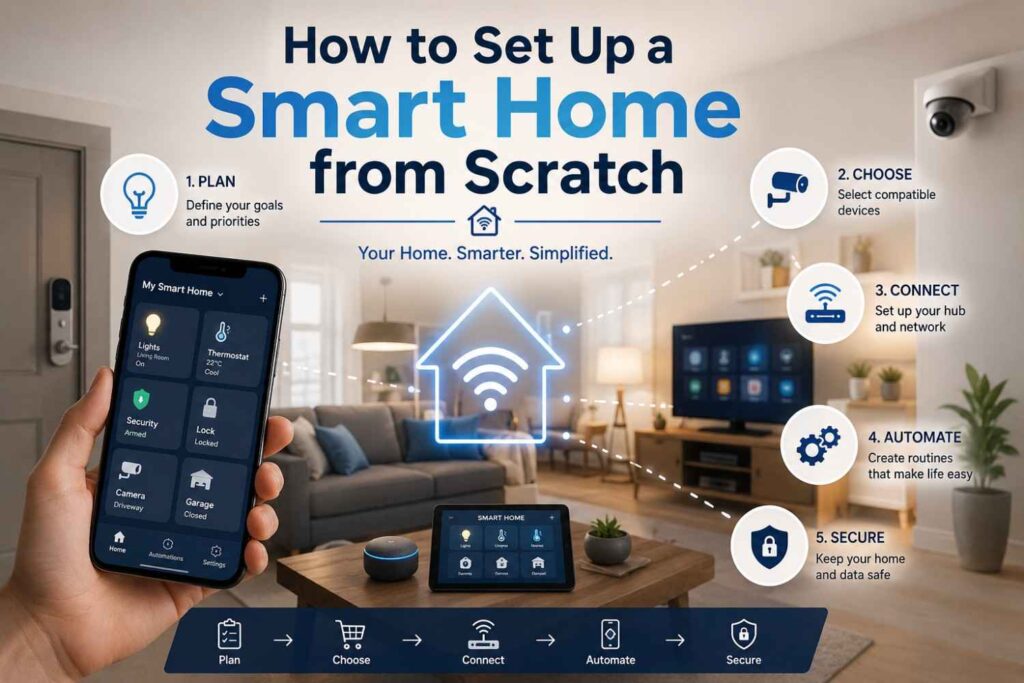
Setting up a smart home from scratch can feel confusing at first. There are smart speakers, hubs, bulbs, cameras, locks, thermostats, sensors, apps, Wi-Fi settings, and automation routines. If you buy devices without a plan, your smart home can quickly become messy and hard to manage.
In my view, the best way to build a smart home is to start simple. Choose one ecosystem, begin with useful devices, secure your network, and expand slowly. A smart home should make daily life easier, not more complicated.
This guide explains How to Set Up a Smart Home from Scratch in a practical way. You will learn how to choose a platform, plan your devices, install your first products, create automations, improve security, and expand your system over time.
A smart home does not need to be expensive or fully automated on day one. You can start with a smart speaker, two smart bulbs, and one smart plug. Then you can add cameras, locks, thermostats, sensors, and routines when you are ready.
Understanding What a Smart Home Really Means
A smart home is a living space that uses connected devices to control, monitor, and automate everyday functions. These functions may include lighting, temperature, security, entertainment, appliances, and energy use. The main goal is to make your home more convenient, efficient, and responsive to your lifestyle. Before buying anything, it is important to understand what makes a home “smart” and which features actually matter for your daily routine.
What Is a Smart Home?
A smart home uses internet-connected devices that can be controlled through a mobile app, voice assistant, schedule, sensor, or automation rule. For example, you can turn off lights from your phone, ask a voice assistant to lock the door, or set your thermostat to adjust automatically at night.
The devices usually connect through Wi-Fi, Bluetooth, Thread, Zigbee, Z-Wave, or a smart home hub. Some devices work independently, while others work best when connected to a central platform like Amazon Alexa, Google Home, Apple Home, or Samsung SmartThings.
Why People Build Smart Homes
People build smart homes for different reasons. Some want comfort and convenience. Others want better security, energy savings, or easier control of devices. A smart home can help older adults, busy families, remote workers, and frequent travelers manage their home with less effort.
For example, a smart camera can show who is at the door. A smart plug can turn off an appliance remotely. A smart light can turn on when motion is detected. These small upgrades can make a big difference when they work together.
Smart Home Benefits at a Glance
| Smart Home Benefit | Example Device | Practical Use |
|---|---|---|
| Convenience | Smart speaker | Control lights, music, and routines by voice |
| Security | Smart camera | Monitor doors, driveways, and entry points |
| Energy savings | Smart thermostat | Adjust heating and cooling automatically |
| Safety | Leak sensor | Alert you when water is detected |
| Accessibility | Voice assistant | Help users control devices hands-free |
| Comfort | Smart lighting | Change brightness and color by room or time |
This table shows why smart home systems are useful. The value comes from matching devices with real needs, not buying every gadget available.
Choose the Right Smart Home Platform First
Before you buy smart home devices, choose your main platform. This is one of the most important steps because your platform controls how your devices connect, communicate, and respond. A smart home platform works like the main control system for your home. It helps you manage devices from one app, create routines, and use voice commands. Choosing the right platform early can prevent compatibility problems later.
Popular Smart Home Platforms
The most common smart home platforms are Amazon Alexa, Google Home, Apple Home, and Samsung SmartThings. Each one works well, but the best choice depends on your phone, devices, privacy preferences, and daily habits.
Amazon Alexa is popular because it supports many third-party devices. Google Home works well for people who already use Google services. Apple Home is a strong option for users who prefer Apple devices and privacy-focused controls. Samsung SmartThings is useful for users who want broader device automation and hub-based control.
Why Compatibility Matters
Not every smart device works with every platform. Before buying a device, check whether it supports your chosen ecosystem. Look for labels such as “Works with Alexa,” “Works with Google Home,” “Works with Apple Home,” or “Matter compatible.”
Matter is a smart home connectivity standard designed to improve compatibility across ecosystems. The Connectivity Standards Alliance describes Matter as a unifying, IP-based connectivity protocol for reliable and secure IoT ecosystems. This means Matter-compatible devices can make it easier to build a smart home across different brands.
Do You Need a Smart Home Hub?
You do not always need a separate hub. Many Wi-Fi devices connect directly to your router and app. However, a hub can make your system more stable, especially if you use Zigbee, Z-Wave, or Thread devices.
A hub can also improve automation speed and reduce the number of devices relying only on Wi-Fi. If you plan to build a larger home automation system, a hub may be helpful. If you are starting small, a smart speaker and a few Wi-Fi devices may be enough.
Plan Your Smart Home Setup Before Buying Devices
Planning saves money and prevents frustration. Many beginners buy smart home devices randomly and later discover they need different apps, bridges, subscriptions, or platforms. A better approach is to decide what problems you want to solve first. Do you want better lighting, stronger security, lower energy use, or hands-free control? Once you know your goals, it becomes easier to choose the right smart home devices.
Start With Your Main Goals
Before buying devices, write down your top three smart home goals. For example:
- I want to control lights from my phone.
- I want to monitor my front door.
- I want to save energy on heating and cooling.
These goals help you decide where to start. If your goal is security, begin with cameras, smart locks, and door sensors. If your goal is comfort, start with lighting, plugs, and thermostat control.
Choose Devices Room by Room
A room-by-room plan makes setup easier. Start with high-use spaces like the living room, bedroom, kitchen, and entryway. Do not try to automate the whole house in one day.
| Room | Best Starter Devices | Useful Automation Idea |
|---|---|---|
| Living room | Smart speaker, smart bulbs, smart plug | Movie mode turns lights dim |
| Bedroom | Smart bulbs, smart speaker, smart plug | Good night routine turns devices off |
| Kitchen | Smart plug, leak sensor, smart display | Reminder routine for appliances |
| Entryway | Smart lock, camera, motion sensor | Lights turn on when door opens |
| Hallway | Motion sensor, smart lights | Night light turns on after sunset |
This plan keeps your setup practical. You can test each room before expanding to the next.
Set a Realistic Budget
A basic smart home setup can start small. Prices vary by region, brand, and features, so exact costs should be checked before purchase. A beginner setup may include one smart speaker, two smart bulbs, one smart plug, and one smart camera.
| Starter Setup Item | Purpose | Estimated Budget Range |
|---|---|---|
| Smart speaker or display | Voice control and routines | [FACT NEEDS VERIFICATION] |
| Smart bulbs | Lighting control | [FACT NEEDS VERIFICATION] |
| Smart plugs | Appliance control | [FACT NEEDS VERIFICATION] |
| Smart camera | Basic security monitoring | [FACT NEEDS VERIFICATION] |
| Smart thermostat | Energy control | [FACT NEEDS VERIFICATION] |
Because prices change often, it is better to compare current prices from official brand pages, local retailers, or trusted marketplaces before buying.
Install Your First Smart Home Devices Step by Step
Once you have selected your platform and first devices, the next step is installation. Most beginner smart home devices are designed for simple setup through a mobile app. Still, you should follow a careful process to avoid connection problems. Good device names, strong Wi-Fi coverage, and correct app pairing will make your smart home easier to manage later.
Prepare Your Wi-Fi and Mobile Apps
Most smart home devices need a stable internet connection. Many entry-level smart bulbs, plugs, and cameras use 2.4 GHz Wi-Fi because it usually offers better range than 5 GHz. Check the product manual before setup.
Before installing devices, update your phone, download the manufacturer’s app, and create a strong password for the account. If the app offers two-factor authentication, enable it. CISA recommends evaluating security settings, changing default passwords, and updating firmware for IoT devices.
Connect and Name Devices Clearly
Clear naming helps voice assistants understand commands. Instead of naming a bulb “Light 1,” name it “Living Room Lamp” or “Bedroom Ceiling Light.” This makes commands easier.
Basic setup usually follows this process:
- Plug in or power on the smart device.
- Open the manufacturer’s app.
- Add the device through the app.
- Connect it to Wi-Fi or hub.
- Link it to your main platform.
- Rename it clearly by room and purpose.
- Test it through the app and voice assistant.
This simple process works for many smart plugs, bulbs, speakers, and cameras.
Test Before You Expand
After installing your first few devices, test them for a few days. Check whether they respond quickly, stay connected, and work with voice commands. If a device disconnects often, the issue may be weak Wi-Fi, outdated firmware, or poor compatibility.
Testing early helps you avoid buying more devices from a brand or system that does not work well in your home. A smart home setup guide should always focus on stability before expansion.
Create Smart Home Automation and Routines
Automation is what makes a smart home feel truly smart. Without automation, you only have connected devices that you control manually. With routines, your devices can respond to time, motion, location, voice commands, or sensor activity. This is where your smart home starts saving time and effort. The best automations are simple, useful, and based on real habits.
What Is a Smart Home Routine?
A smart home routine is a set of actions triggered by one command or condition. For example, when you say “Good night,” your system can turn off lights, lock the door, lower the thermostat, and arm security devices.
Routines can be triggered by:
- Time of day
- Voice command
- Motion sensor
- Door sensor
- Location
- Sunrise or sunset
- Device status
A good routine should solve a real daily problem. Avoid making routines too complex at the start.
Beginner Automation Ideas
| Routine Name | Trigger | Action |
|---|---|---|
| Good Morning | 7:00 AM | Turn on bedroom light and start news |
| Good Night | Voice command | Turn off lights and lock doors |
| Away Mode | User leaves home | Turn off plugs and activate cameras |
| Welcome Home | Door opens after sunset | Turn on entryway lights |
| Energy Saver | No motion detected | Turn off selected lights |
These routines are simple but useful. They reduce repeated tasks and make the home feel more responsive.
Avoid Over-Automation
Automation should help, not annoy. If lights turn off while someone is still in the room, or cameras send too many alerts, the system becomes frustrating.
Start with two or three routines. Watch how they work in real life. Then adjust timing, triggers, and device actions. A good beginner smart home should grow slowly based on real use.
Secure Your Smart Home and Protect Your Privacy
Security is one of the most important parts of setting up a smart home from scratch. Every connected device can become a possible entry point if it has weak settings, old firmware, or poor password protection. Smart cameras, locks, speakers, and sensors may also collect sensitive information about your home and habits. That is why smart home security must be part of your setup from day one.
Use Strong Passwords and Two-Factor Authentication
Use a strong, unique password for every smart home account. Do not reuse the same password across platforms. If a device or app offers two-factor authentication, turn it on.
You should also change default passwords on routers, cameras, and IoT devices. CISA lists changing default passwords and upgrading firmware as important security steps for IoT devices.
Keep Firmware and Apps Updated
Firmware updates fix bugs, improve performance, and patch security issues. NIST research notes that unsupported smart home devices can create safety and security concerns because vulnerable devices may remain connected without updates.
Before buying a device, check whether the brand provides regular updates. Avoid products from companies that do not clearly explain support policies. A cheap smart device can become expensive if it becomes unsafe or unsupported.
Separate Smart Devices From Personal Devices
If your router supports it, place smart home devices on a separate guest network or IoT network. This can help separate smart bulbs, plugs, cameras, and sensors from your personal laptops, phones, and work devices.
This step is especially useful if you have many connected devices. It adds another layer of protection and makes your network easier to manage.
Expand Your Smart Home Slowly and Responsibly
After your basic setup works well, you can expand your smart home over time. This is where you can add advanced devices like smart thermostats, smart locks, smart blinds, robot vacuums, water leak sensors, and energy monitoring tools. The key is to expand based on real needs, not trends. A smart home should remain simple, stable, and easy for everyone in the house to use.
Add Energy-Saving Devices
Smart thermostats are one of the most useful upgrades for energy management. ENERGY STAR says certified smart thermostats are independently certified based on field data to deliver energy savings. ENERGY STAR also notes that average savings are about 8% of heating and cooling bills, or around $50 per year, though savings can vary by climate, equipment, and comfort preferences.
Smart plugs and smart lights can also help reduce wasted electricity by turning off devices automatically when they are not needed.
Add Security and Safety Devices
Smart security devices can include doorbell cameras, indoor cameras, outdoor cameras, smart locks, motion sensors, door sensors, smoke detectors, and water leak sensors.
Start with entry points first. The front door, back door, driveway, and garage are usually high-value areas. Then add safety sensors in places like the kitchen, laundry room, bathroom, and basement.
Review Your Setup Every Few Months
A smart home is not a one-time project. Review your devices every few months. Remove devices you do not use. Update apps. Check passwords. Review camera privacy settings. Make sure automations still match your routine.
This maintenance keeps your smart home secure, useful, and organized.
Frequently Asked Questions About How to Set Up a Smart Home from Scratch
This FAQ section answers common beginner questions in a clear AEO-friendly style. These answers are designed for readers who want quick guidance before buying or installing smart home devices. They also help cover search questions related to smart home setup, smart home hubs, automation, privacy, and device compatibility.
What is the first thing I should buy for a smart home?
The first thing to buy is usually a smart speaker or smart display that works with your chosen platform. It gives you voice control, app control, and routine support. After that, start with simple devices like smart bulbs, smart plugs, or one security camera.
Do I need a smart home hub?
You do not always need a smart home hub. Many Wi-Fi devices connect directly to your router. However, a hub can help if you use Zigbee, Z-Wave, or Thread devices. It can also improve reliability in larger smart home systems.
Can I set up a smart home without changing wiring?
Yes, you can set up many smart home devices without changing wiring. Smart plugs, smart bulbs, smart speakers, smart cameras, and many sensors are plug-and-play. However, smart switches, smart thermostats, and some locks may need careful installation or professional help.
How much does it cost to set up a smart home from scratch?
The cost depends on the devices, brand, home size, and features you choose. A small starter setup can include a smart speaker, bulbs, plugs, and one camera. Exact pricing changes often, so check current prices from official product pages or trusted retailers. [FACT NEEDS VERIFICATION]
What is Matter in smart home devices?
Matter is a smart home connectivity standard created to improve device compatibility across brands and platforms. Matter-compatible devices can make setup easier because they are designed to work across supported ecosystems. It is useful for people who do not want to be locked into one brand.
Are smart homes safe from hackers?
Smart homes can be safer when you use strong passwords, two-factor authentication, firmware updates, secure Wi-Fi, and separate networks for IoT devices. They are not automatically secure. You must configure devices carefully and avoid unsupported products that no longer receive updates.
What are the best smart home devices for beginners?
The best beginner smart home devices are smart speakers, smart bulbs, smart plugs, smart cameras, and motion sensors. These are easy to install and useful in daily life. After that, you can add smart locks, thermostats, leak sensors, and smart switches.
Conclusion
Learning How to Set Up a Smart Home from Scratch is easier when you follow a clear plan. Start by understanding your goals, choosing one smart home platform, and buying only a few useful devices. Set them up carefully, name them clearly, and test them before expanding.
Once the basics work, create simple automations for lighting, security, comfort, and energy savings. Protect your smart home with strong passwords, updates, secure Wi-Fi, and privacy settings. Then expand slowly with devices that solve real problems in your home.
A smart home should feel simple, helpful, and reliable. With the right approach, you can build a smart home that saves time, improves comfort, strengthens security, and grows with your lifestyle.